VirusTotal scan snapshot
For the SHA-256 listed below, VirusTotal reported no vendor detections in its latest analysis on October 19, 2026 (14:37 UTC).
0 / 68vendors flagged
Get the Android APK and follow the illustrated installation steps below. Before downloading, review the file identity and dated VirusTotal scan details so you can make an informed decision.
Android APK · Version 3.5.1 · File size 16.86 MB · Not available as an official iOS app or Windows .exe
 Android APK · v3.5.1
For the SHA-256 listed below, VirusTotal reported no vendor detections in its latest analysis on October 19, 2026 (14:37 UTC).
Only install if you trust the source and understand the risks of third-party apps. Android menus may vary by device and version.
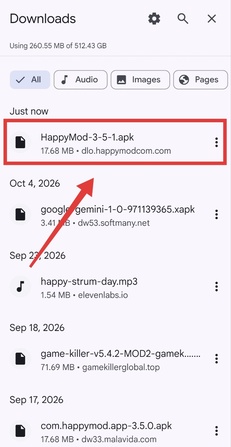
Tap the Download APK button above. When the download finishes, open your browser's Downloads list and confirm the file name is HappyMod-3-5-1.apk. Check the file hash if you need to verify the exact file.
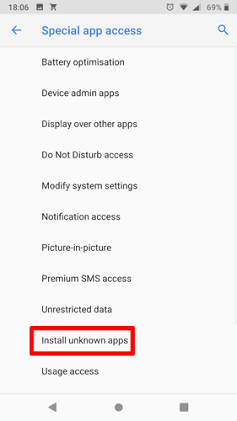
If Android displays a warning, open Settings from the prompt, then enable Install unknown apps for the browser or file manager you used. Grant this permission only to the app you trust, and turn it off again after installation.

Return to Downloads, tap the APK, and read Android's installation prompt. Install only if the permissions and source make sense to you. Cancel and delete the APK if anything seems unexpected.
Keep Android security updates and Play Protect enabled. Consider a separate test environment, avoid entering passwords or payment details in MOD apps, and uninstall the app if it behaves unexpectedly.
Install blocked? Android may prevent sideloading by default. Only change the setting for the specific browser/file manager needed for the install, and disable that permission again afterward. Do not bypass a warning if you cannot verify the file or are unsure about its permissions.
Quick answers to common questions about the HappyMod 3.5.1 APK.
Use the Download APK button on this page. The link points to the APK URL supplied for this site. Always check the filename and verify the SHA-256 if you need to confirm that the downloaded file matches the VirusTotal report.
Download the APK, open it from your Downloads list, and follow Android's prompt. If blocked, open Settings from the warning and temporarily allow your browser or file manager to install unknown apps. Disable that permission again after installing.
Menu names and locations differ between Android versions and device manufacturers. Tap the Settings option in Android's install warning; it should open the permission page for the app that downloaded the APK. Do not enable the setting for unrelated apps.
The linked report showed 0 of 68 security vendors flagging this SHA-256 in its latest analysis on October 19, 2026 at 14:37 UTC. This is a time-specific scan snapshot, not a certification or proof that the APK is safe. The report also labels the file as obfuscated.
Compare the APK's SHA-256 with the report value: 013a8ad897a1c98495234a14960a6d2728cae42d76723a216a4bfb1b709050b0. A matching hash confirms the file contents match that report; it does not prove those contents are harmless.
The VirusTotal metadata lists minimum SDK API 24, which corresponds to Android 7.0. Devices running older Android versions may be unable to install it. Compatibility can also depend on hardware and the app version.
There is no official HappyMod iOS app or Windows .exe. Be cautious of downloads claiming otherwise. On a PC, an Android emulator may run an Android APK, but that does not remove the risks associated with third-party packages.
Android warns about apps installed from outside trusted app stores. If the source, file identity, or requested permissions are unclear, cancel the installation. If installation fails, confirm that your Android version meets the minimum requirement and that the APK finished downloading; do not install replacement files from unknown sites.
There is no guarantee that a modified app protects your data or complies with a service's terms. Avoid entering passwords, payment details, or sensitive personal information; MOD use may also lead to account restrictions or loss.
Review the file information and installation notes before proceeding.